
🔍 Read the full analysis: 10 Best 3D Printers To Bring Multicolor Ideas To Everyday Projects In 2027 on ThorstenMeyerAI.com

Get business pricing on office and shipping supplies
- Business-only prices and quantity discounts
- Tax-exempt purchasing
- Multiple users, one account, clear invoices
TL;DR
A buyer’s guide from ThorstenMeyerAI.com compares 10 3D printers for everyday and multicolor projects, naming the Bambu Lab P2S Combo its leading all-around pick. The comparison highlights tradeoffs among enclosed and open-frame designs, filament-switching systems, multiple toolheads, speed and setup; real-world performance and suitability depend on users’ projects and materials.
ThorstenMeyerAI.com has compared 10 3D printers for buyers planning multicolor and everyday projects in 2027, ranking the Bambu Lab P2S Combo as its leading all-around choice. The guide focuses on practical differences in material handling, enclosure, setup and print workflow rather than treating speed or color count alone as a measure of value, as detailed in the original analysis.
The guide favors the P2S Combo because it pairs an enclosed printer with an included multicolor material system. It presents the package as a convenient starting point for buyers who want those features together, rather than a direct performance winner under every set of conditions. The source does not provide test measurements, prices or a dated testing method, so the ranking is best read as the publisher’s recommendation, not an independently verified benchmark.
Several Bambu Lab models are separated by what comes in the box. The P1S is described as an enclosed printer without bundled multicolor hardware, while the P1S Combo adds an AMS system. The A1 Combo is positioned as a more approachable option for hobbyists, with an open-frame design that may suit users whose materials and workspace do not call for an enclosure. This 3D printer guide also compares models for hobby and multicolor projects.
The list also compares machines with different approaches to color and speed. The Snapmaker U1 uses four toolheads, unlike systems that switch filaments through material-handling hardware. The Adventurer 5M is highlighted for fast CoreXY printing; the Kobra X, AD5X and K2 Combo are included as other routes to multicolor work. The source does not supply full specifications or a detailed account of how each printer performed.
The 10 picks
- 1
 Snapmaker U1 3D Printer with 4-Toolhead and 5-Second Tool ChangerView on Amazon →
- 2
 Bambu Lab P2S Combo – P2S 3D Printer with AMS 2 Pro (Multi‑Color)View on Amazon →
- 3
 Bambu Lab P1S Combo 3D Printer with AMS – Multi‑Color PrintingView on Amazon →
- 4
 Creality K2 Combo 3D Printer, Multicolor Printing, Max 600mm/s Speed, Auto Le…View on Amazon →
- 5
 Bambu Lab A1 Combo + LED Lamp Kit (with AMS Lite)View on Amazon →
- 6
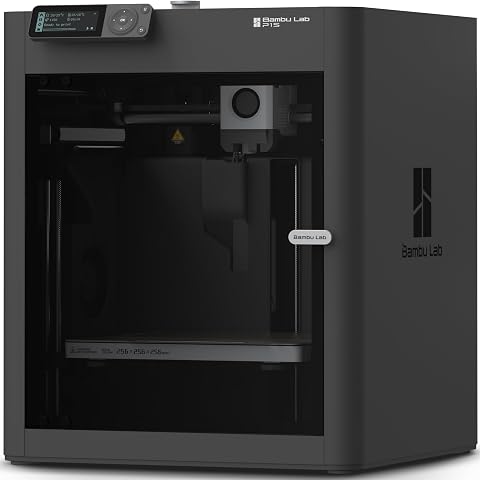 Bambu Lab P1S 3D PrinterView on Amazon →
- 7
 Anycubic Kobra X Multicolor 3D PrinterView on Amazon →
- 8
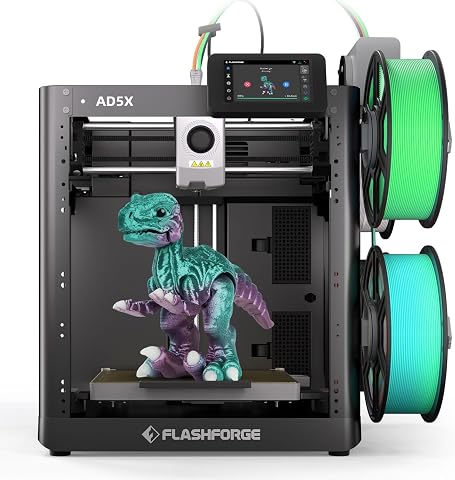 Flashforge AD5X Multi-Material 3D PrinterView on Amazon →
- 9
 Bambu Lab A1 FDM 3D PrinterView on Amazon →
- 10
 FLASHFORGE Adventurer 5M 3D Printer, All-Metal CoreXY, 600mm/s Max TravelView on Amazon →
How Multicolor Changes the Choice
The comparison matters because multicolor printing involves practical costs as well as visual options. Filament-switching workflows can require more time and may produce purge waste, particularly on prints with frequent color changes. A printer with multiple toolheads uses a different workflow, but buyers still need to judge whether that approach suits the objects they make and the complexity they want to manage.
For everyday users, the guide’s central point is that a more elaborate printer is not automatically a better fit. Someone making mostly small, single-color parts may gain little from an automated multicolor system, while an enclosure may be unnecessary for their usual materials. Conversely, users who make decorative pieces, labels or parts from different materials may value the additional capability. The useful choice depends on actual projects, available bench space and tolerance for setup and maintenance.
Products Worth Considering

LG UltraGear 27G640A-B 27-Inch QHD IPS Gaming Monitor, 300Hz, 1ms, G-SYNC Compatible, FreeSync Premium, DisplayHDR 400, HDMI 2.1, USB-C, Adj

Logitech MX Keys S Combo Wireless Keyboard and Mouse, Graphite

Logitech MX Master 4 Ergonomic Wireless Mouse with Haptic Feedback, Graphite
As an affiliate, we earn on qualifying purchases.
The Guide’s Selection Criteria
ThorstenMeyerAI.com says it compared the 10 models on print-system design, material handling, enclosure, setup, expected maintenance and versatility. It gave extra weight to whether a multicolor bundle included the material-handling hardware, and distinguished enclosed CoreXY printers from open-frame machines rather than ranking solely on advertised speed. The source says the order favors broad usefulness, followed by more specialized strengths.
The guide also cautions readers to match an enclosure to expected materials and workspace, and to check build volume against real models rather than rare oversized projects. Maximum travel speed does not establish how quickly every object will print at acceptable quality: geometry, layer height, material and cooling also affect results. These are decision criteria from the source, not published comparative test results for the listed products.
“The P2S Combo ranks first as the most complete general-purpose bundle in this group.”
— ThorstenMeyerAI.com guide
What the Comparison Does Not Establish
The supplied material does not include the publication date, prices, full specifications, test procedures or measured results for the 10 printers. It is not clear whether the publisher tested every model directly, under what print settings any comparisons were made, or how the products’ prices and availability may vary by market. No warranty, support or long-term reliability findings are given.
The source describes potential tradeoffs, including added print time and purge waste from frequent filament changes, but provides no quantities for those effects. It also does not give a full model-by-model assessment of materials, print quality or maintenance. Buyers should treat the rankings as editorial guidance and check current manufacturer specifications and bundle contents before purchasing.
Checks Before Buying a Printer
The next step for readers is to compare current specifications, bundle contents and local pricing for the models that fit their projects. Buyers can measure their work area, identify the materials they expect to use and decide whether color changes will be frequent enough to justify an automated system. Checking ventilation and access needs is also relevant when considering an enclosed machine.
The source does not announce further testing or a forthcoming update. Product availability, prices and features can change, so the comparison’s 2027 recommendations should be checked against current manufacturer listings before a purchase. A buyer whose needs are mostly single-color or occasional printing may reasonably prioritize a simpler workflow over the top-ranked package.
Key Questions
Which printer does the guide rank first?
ThorstenMeyerAI.com ranks the Bambu Lab P2S Combo first, citing its combination of an enclosed printer and included multicolor material system. This is the guide’s recommendation, not a guarantee that it is best for every buyer.
How does the P1S differ from the P1S Combo?
The source describes the P1S as a standalone enclosed printer without bundled multicolor hardware. The P1S Combo adds an AMS system for handling multiple filaments.
What makes the Snapmaker U1 different?
The guide identifies the Snapmaker U1’s four-toolhead system as a different way to approach multicolor printing from systems that switch filaments. It does not provide comparative measurements of waste, print time or quality.
Should every buyer choose a multicolor printer?
No. The guide says buyers who mostly print small, single-color projects may not need the added hardware and workflow. Material choices, project frequency and willingness to manage setup should guide the decision.
Does the guide provide independent performance test results?
The supplied source describes selection criteria and rankings but provides no test protocol or measured model-by-model results. Readers should check current specifications and seek additional testing before relying on performance comparisons.
Source: ThorstenMeyerAI.com