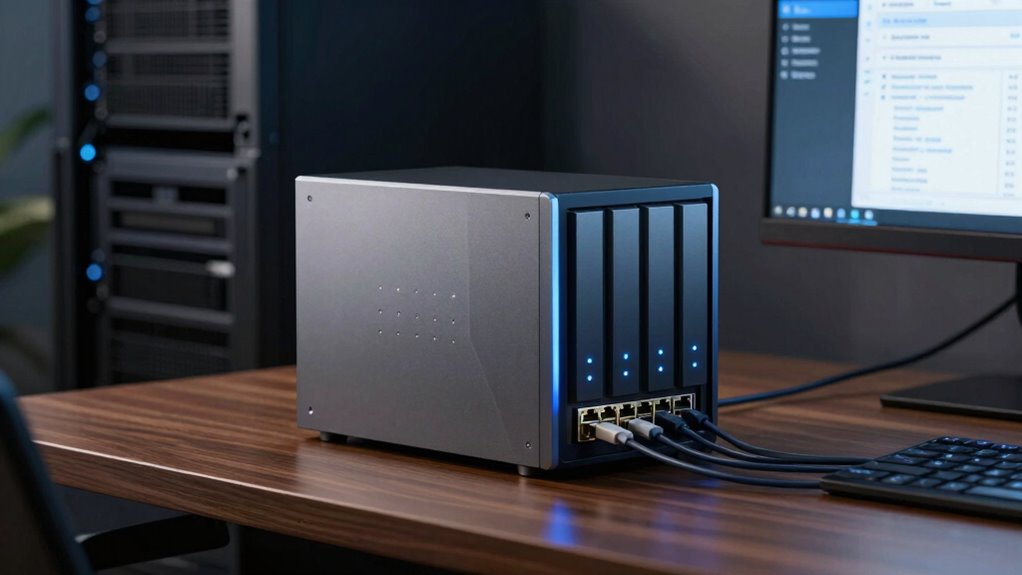

To guarantee your business data stays protected, look for a NAS that offers cloud synchronization, enabling automatic updates and remote access. Power management features like scheduled shut-down and UPS support help reduce costs and hardware strain. Also, check for advanced backup options such as RAID, snapshots, and off-site backups to safeguard against data loss. Combining these features not only enhances protection but also boosts efficiency—more details await those who explore further.

Get business pricing on office and shipping supplies
- Business-only prices and quantity discounts
- Tax-exempt purchasing
- Multiple users, one account, clear invoices
Key Takeaways
- Cloud synchronization ensures automatic, secure, and remote access to business data across multiple platforms.
- Power management features reduce energy costs, extend hardware lifespan, and prevent data loss during outages.
- RAID and snapshot capabilities provide data redundancy and point-in-time recovery for business continuity.
- Automated backup scheduling and user access controls enhance backup consistency and security.
- Energy-efficient hardware and advanced power controls promote sustainability while maintaining reliable backups.

Network Attached Storage (NAS) devices have become essential tools for businesses seeking reliable backup solutions. When choosing a NAS, you want features that guarantee your data stays safe, accessible, and easy to manage. One key feature to contemplate is cloud synchronization. This capability allows you to seamlessly connect your NAS to cloud services like Google Drive, Dropbox, or OneDrive. With cloud sync, your data automatically updates across platforms, providing an extra layer of security and assuring your backups are current without manual intervention. This is especially valuable if you experience hardware failure or cyber threats; your data remains protected in the cloud, and recovery becomes straightforward. Cloud synchronization also simplifies remote access, letting you retrieve files from anywhere, which boosts productivity and responsiveness.
Power management is another critical feature that often gets overlooked but can considerably impact your operational costs and hardware longevity. Efficient power management ensures your NAS consumes only the necessary energy, reducing electricity bills and environmental impact. Look for devices that offer features like scheduled power on/off, auto power-down, or sleep modes during periods of inactivity. These options help extend the lifespan of your hardware because less wear and tear occurs when devices aren’t constantly running. Additionally, power management features can prevent data loss caused by unexpected shutdowns during power outages, especially if your NAS supports uninterruptible power supplies (UPS). A well-designed power management system also provides notifications for power events, allowing you to respond quickly to issues before they escalate into data loss or hardware damage. Incorporating power management features into your NAS setup can also contribute to more sustainable business practices by reducing overall energy consumption. Moreover, selecting NAS devices with advanced power controls can further optimize energy use and improve system resilience. Recognizing the importance of off-site backups can further strengthen your data protection strategy, ensuring data availability even in catastrophic scenarios. Investing in power-efficient hardware and energy-saving settings can help businesses reduce operational costs while maintaining reliable backups.
Beyond cloud sync and power management, reliable backups depend on other features such as RAID configurations, snapshot capabilities, and user access controls. However, cloud synchronization guarantees your data is continuously backed up off-site, offering peace of mind against local failures. Meanwhile, power management minimizes operational disruptions and hardware stress, prolonging the lifespan of your NAS investment. A comprehensive backup strategy also benefits from automated backup scheduling, which helps ensure consistent and timely data backups without manual effort. These features foster a resilient backup strategy that keeps your business data secure, accessible, and protected against unforeseen events. As you evaluate NAS options, prioritize devices that seamlessly integrate cloud sync and offer advanced power management options to optimize your backup process. This combination assures you’re prepared for both current needs and future growth, maintaining data integrity and operational efficiency at all times.
As an affiliate, we earn on qualifying purchases.
Frequently Asked Questions
How Often Should I Perform Backups on My NAS Device?
You should perform backups on your NAS device regularly—ideally, daily or weekly—based on your data’s importance. Use backup scheduling to automate this process, ensuring backups happen consistently. Prioritize data redundancy by creating multiple copies across different locations or devices. This way, if one backup fails or data is compromised, you can quickly restore from another, minimizing downtime and data loss.
Can NAS Backups Be Encrypted for Added Security?
Ever wonder if your NAS backups can stay safe from prying eyes? Yes, they can be encrypted for added security. Using strong encryption protocols like AES, you can secure your data during transmission and storage. Security enhancements like this protect sensitive information, ensuring only authorized access. Implementing encryption on your NAS provides peace of mind, knowing your backups are safeguarded against cyber threats and unauthorized access.
What Is the Typical Cost of a Business-Grade NAS?
A business-grade NAS typically costs between $1,000 and $5,000, depending on capacity and features. You’ll want a model that offers data redundancy to protect against drive failures and supports flexible network configurations for seamless integration. Higher-end units may include advanced security, encryption, and scalability options, making them a worthwhile investment for reliable, secure backups. Be prepared to evaluate ongoing costs for maintenance and additional drives.
How Scalable Are NAS Solutions for Growing Businesses?
You’ll find NAS solutions highly scalable for growing businesses, offering seamless cloud integration and remote access capabilities. As your data needs expand, you can add more drives, upgrade hardware, or connect to cloud services effortlessly. This flexibility guarantees your storage grows with your business, enabling you to access files remotely and integrate new cloud-based tools easily, keeping your operations smooth and adaptable at every stage of growth.
Is Technical Expertise Required to Set up NAS Backups?
Setting up NAS backups typically doesn’t require extensive technical expertise, especially with user-friendly models. You can usually handle the technical setup yourself by following clear instructions, which often include configuring user training resources. Most NAS devices come with intuitive interfaces, making it easier for you to manage backups without needing advanced skills. However, if your backup needs are complex, seeking professional assistance can guarantee a smoother, more reliable setup process.
As an affiliate, we earn on qualifying purchases.
Conclusion
So, next time you’re choosing a NAS for your business backups, remember—it’s not just about the shiny lights or the fancy apps. Skip the features that don’t matter, like glittering aesthetics or blinky buttons. Focus on reliability, speed, and easy recovery. After all, nothing screams “professional” like losing essential data because you got dazzled by an overhyped gadget. Backup smart, or prepare to explain to the boss why your data went on vacation without you.
As an affiliate, we earn on qualifying purchases.
Uninterruptible Power Supply for NAS
As an affiliate, we earn on qualifying purchases.
As an affiliate, we earn on qualifying purchases.
Fall Picks
fall essentials
As an affiliate, we earn on qualifying purchases.