

This checklist is for small business owners who want to create social media content with a practical, repeatable setup. It covers a few tools that can support recording, planning, and storing content, with simple setup choices at the center.

Get business pricing on office and shipping supplies
- Business-only prices and quantity discounts
- Tax-exempt purchasing
- Multiple users, one account, clear invoices
The sections follow the path from capturing footage to organizing and saving it: a smartphone tripod, ring light, wireless microphone, green screen, content planner, and external SSD. Picks are included where provided; the ring light section offers general guidance.
Use the checklist to identify what would improve your current workflow, then consider fit with your phone, recording space, and existing equipment. You can build the setup in stages, focusing first on your biggest content bottleneck.
Smartphone tripod
A stable phone position helps make recording easier to repeat, whether you are filming a short update, a product demonstration, or a talking-head clip. A tripod can also free your hands and help keep framing consistent across multiple takes. The listed pick is a Ring Light with Stand Tripod for iPhone, 10” Overhead Camera Mount; its name indicates a phone-focused setup with an overhead mount, so think about how you plan to position the camera before choosing it.
A common mistake is choosing a stand based on the word “tripod” without checking whether its mounting style suits the shot. Overhead framing can be useful for desk or tabletop content, while eye-level recording calls for a different camera position. Check that your phone fits the holder and that the stand can be placed where you intend to record. Consider the available floor or desk space, the height and angle you need, and whether you will move the setup between locations. Match the mount to your shot and verify phone compatibility before relying on it for a recording session.
What to look for:
- Confirm the holder fits your smartphone.
- Check whether an overhead mount suits your planned shots.
- Consider the stand’s placement in your recording area.
- Look for angle and height adjustment that fits your framing needs.
Ring Light with Stand Tripod for iPhone, 10” Overhead Camera Mount, Adjustable S

This versatile ring light and tripod combo is designed for content creators, offering adjustable height up to 70.8 inches and flexible angles for overhead shots, tutorials, and streaming. It features customizable lighting with multiple color and brightness settings, a stable aluminum alloy build, and quick setup with universal phone compatibility.
Pros:
- Adjustable height and flexible arm for versatile shooting angles
- Customizable lighting with multiple color and brightness options
- Stable and durable construction suitable for various environments
- Quick setup and universal phone compatibility
Cons:
- Not suitable for heavy cameras
- Base size not specified, which may affect stability on uneven surfaces
- Remote control functionality details are limited
Best for: Small businesses recording phone-based content at a desk or overhead setup
Not ideal for: Creators who need a mount specifically confirmed for a different camera or setup
Bottom line: Choose this tripod when its phone holder and overhead positioning match the way you plan to record.
Ring light
Lighting affects how clearly viewers can see you and your subject, so a ring light may be useful when your recording area has uneven or limited light. Since no product was specified for this section, treat it as a setup decision rather than a particular pick. First observe the light where you usually record, including how it changes during the day, then decide whether an additional light would address a real need.
A common buying mistake is picking a light before checking where it will sit and how it will work with the camera. Think about the space available around your phone or camera, whether the light can be positioned without obstructing your view, and whether its controls are convenient during recording. If you already have suitable lighting, another device may add clutter without improving your workflow. Check that the light can be placed at the distance and angle you need, and consider whether the setup will be easy to put away between sessions. Test your recording space first, then choose lighting that fits your framing and routine.
What to look for:
- Assess the light in your usual recording location.
- Check that the light can be positioned around your phone or camera.
- Consider available space and storage between sessions.
- Look for controls and positioning that suit your recording routine.
Wireless microphone
Clear speech helps viewers follow a business update, demonstration, or interview. A wireless microphone kit can support recording when the speaker needs to move or when the microphone should be placed closer to the person speaking. The listed pick is the DJI Mic 3 Wireless Microphone Kit, named as a kit with two transmitters, one receiver, and a charging case. That configuration may suit recording plans involving more than one speaker, but confirm the actual connections and workflow you need.
A common mistake is assuming that a microphone will connect directly to every phone or camera. Before buying, check compatibility with your recording device and whether any adapters or additional steps are needed. Consider how many people will speak in a typical clip, where each person will be positioned, and whether the receiver can connect to your chosen device. Also think about how you will monitor audio and keep the kit charged between sessions. Verify device compatibility and the number of transmitters your workflow requires before recording important content.
What to look for:
- Confirm compatibility with your phone or camera.
- Check that the transmitter count fits your planned number of speakers.
- Verify the receiver connection works with your recording device.
- Consider charging and audio monitoring for your workflow.
DJI Mic 3 Wireless Microphone Kit (2 Transmitters, 1 Receiver, Charging Case)
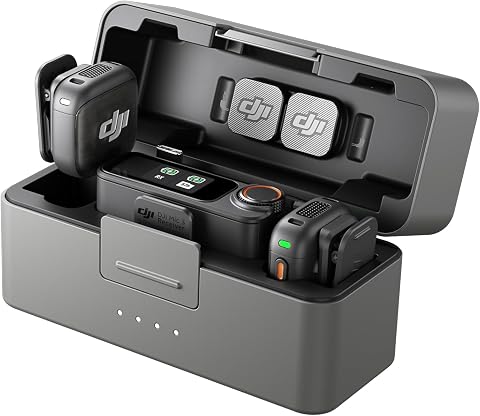
A lightweight wireless lavalier microphone kit for interviews, podcasts, livestreams, and vlogging. It offers adaptive gain control, two noise-cancellation levels, four-channel support, and 32-bit float internal recording, with up to 28 hours of use.
Pros:
- Compact, lightweight design for travel and on-the-go recording
- Supports four-channel output and up to four transmitters
- 32-bit float internal recording helps preserve audio detail
- Up to 28 hours of use
Cons:
- Connecting to Osmo Mobile products requires the first-generation DJI OM Multifunctional Module
- Some listed specifications, such as 500 GHz frequency response, appear inconsistent
Best for: Businesses recording content with up to two speakers in their plans
Not ideal for: Creators whose devices or recording setup are not compatible with the receiver
Bottom line: Choose this kit after confirming its receiver and transmitters fit your devices and recording needs.
Green screen
A green screen can give you a consistent backdrop for content that uses a digital background or requires a plain background for editing. The listed pick, the RAUBAY 78.7 × 82.7 in Collapsible Green Screen Backdrop, has its dimensions stated in the product name and is described as collapsible. Compare those measurements with your recording area and with the camera framing you expect to use, since a backdrop needs to cover the visible space behind the subject.
A frequent mistake is focusing on the backdrop itself without planning where it will stand or how it will be stored. Check whether the stated dimensions cover the width and height visible in your shots, including when you move or gesture. Consider the available floor space, the distance between the subject and backdrop, and whether the collapsible form suits your setup routine. Green screen content also depends on the recording and editing workflow, so confirm that your tools support the background treatment you want. Measure your frame and space before selecting a backdrop, and plan how you will set it up consistently.
What to look for:
- Compare the stated dimensions with your camera framing.
- Check that the backdrop can cover the visible background in your shots.
- Consider floor space and subject distance.
- Confirm your recording and editing workflow supports green screen use.
- Plan how the collapsible backdrop will be set up and stored.
RAUBAY 78.7 × 82.7 in Collapsible Green Screen Backdrop

This portable retractable green screen measures 78.7 × 82.7 inches and is designed to fit two people. Its wrinkle-resistant composite polyester screen sets up in a few steps and retracts into a hard case for storage and transport.
Pros:
- Large screen can accommodate two people
- Wrinkle-resistant fabric
- Sets up quickly
- Retracts into a hard case for storage and transport
Cons:
- Not water resistant
- Weighs 10.02 kg
Best for: Businesses with enough space for the stated backdrop dimensions
Not ideal for: Creators who cannot fit a backdrop into their recording area
Bottom line: Check room dimensions and your editing workflow before choosing this green screen.
Content planner
A planner can help turn content ideas into a manageable publishing routine. The listed pick is Social Media Marketing All-In-One for Dummies. Consider how you want to use it alongside your day-to-day planning: for example, as a reference while deciding what to create, or as support for organizing your marketing work. A useful planning approach should make it easier to see what is coming up and who is responsible for each task.
A common mistake is treating a book or planner as a complete workflow by itself. Before relying on this pick, check that its format and guidance suit the platforms and business goals you work with, and decide where you will track actual dates, drafts, and approvals. If several people contribute, think about how they will share updates and keep the schedule current. Pair the resource with a calendar or planning method your team can consistently maintain. Choose a system you will use, and make responsibilities and next steps visible to the people creating content.
What to look for:
- Check whether the resource fits your marketing planning needs.
- Choose a place to record dates, drafts, and approvals.
- Consider how contributors will share updates.
- Make ownership and next steps clear for each planned post.
Social Media Marketing All-In-One for Dummies

A comprehensive guide that walks beginners through the fundamentals of social media marketing, covering platforms, content creation, and analytics. It offers practical tips, step‑by‑step tutorials, and real‑world examples to help readers build effective online campaigns.
Pros:
- Covers all major social media platforms in one volume
- Written in an easy-to-understand, beginner-friendly style
- Includes actionable strategies and real‑world case studies
Cons:
- May be too basic for experienced marketers seeking advanced tactics
Best for: Small business owners who want a resource to support social media planning
Not ideal for: Teams that need a shared scheduling workflow without another planning tool
Bottom line: Use this title as part of a clear planning routine with dates, owners, and next steps.
External SSD
Video files and other content assets need a storage routine that makes them easy to find when it is time to edit or reuse them. The listed pick is the SanDisk 2TB Extreme PRO Portable External SSD. Its name identifies a 2TB portable external SSD; consider whether that capacity and portable format fit the amount of content you expect to keep and the devices you use.
A common mistake is selecting storage without checking how it connects to the computer or other device where files will be transferred. Confirm the connection requirements and compatibility for your equipment, and consider how you will organize folders for drafts, final exports, and reusable assets. Think about where the drive will be kept when traveling or working across locations, and establish a backup routine for important content. An external drive can be part of your storage workflow, but the workflow should also make it clear which files are current and how they can be recovered. Check device connections and plan a consistent file and backup system before moving important content.
What to look for:
- Estimate how much content you plan to store.
- Confirm the SSD’s connection works with your devices.
- Plan folders for drafts, finished content, and reusable assets.
- Consider portability across your work locations.
- Set a backup routine for important files.
SanDisk 2TB Extreme PRO Portable External SSD

The SanDisk 2TB Extreme PRO Portable External SSD offers fast transfer speeds of up to 1050MB/s using NVMe technology. Its rugged aluminum design is water- and dust-resistant with impact protection, making it ideal for creative professionals on the go.
Pros:
- High transfer speeds for quick file movement
- Rugged and durable design with water and dust resistance
- Compatible with both PC and Mac systems
Cons:
- Read speed only; write speed may be lower
- Performance can vary depending on usage conditions
- Slightly higher price due to rugged features
Best for: Businesses that want an external drive for organizing content files
Not ideal for: Users whose devices do not support the drive’s connection requirements
Bottom line: Confirm device compatibility and create a backup routine before making this your content archive.
Build the setup in an order that addresses your most immediate need: start with a stable way to frame your phone, then improve audio or lighting if recording quality calls for it. Add a planner to organize the work and storage for the files you create; consider a green screen when your content plans and space support it. Prioritize the workflow gaps that affect your next recording session.
You do not need every item to begin publishing useful content. Start with the equipment and routines that fit your devices, space, and team, then adjust as your needs become clearer. A consistent, manageable setup makes it easier to keep creating and sharing content.