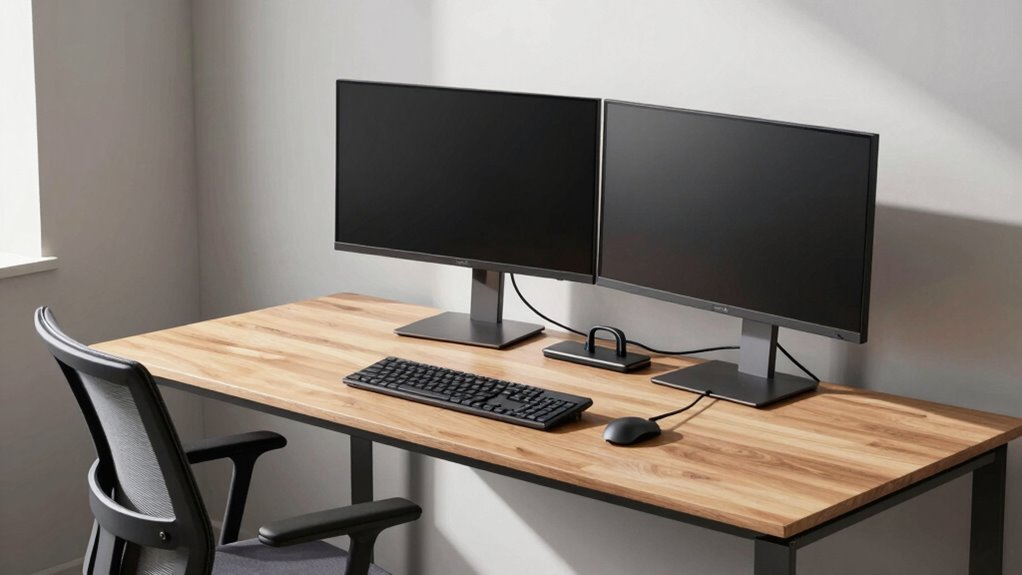

To plan your desk layout effectively, position your workspace near power outlets and use cable management tools to keep cables neat and safe. Arrange screens at eye level and within arm’s reach to reduce strain, and set up your chair and accessories for ergonomic comfort. Design your space to encourage movement by creating zones for standing or walking. If you keep these tips in mind, you’ll build a workspace that’s both efficient and comfortable, with more helpful strategies ahead.

Get business pricing on office and shipping supplies
- Business-only prices and quantity discounts
- Tax-exempt purchasing
- Multiple users, one account, clear invoices
Key Takeaways
- Position your desk near power outlets to minimize cable length and simplify device connections.
- Arrange screens at eye level and at an arm’s length for ergonomic comfort and visual efficiency.
- Design layout to include space for movement, such as standing or walking areas, to reduce stiffness.
- Keep frequently used items within easy reach to avoid unnecessary stretching and promote ergonomic posture.
- Use cable management tools to organize cords neatly, preventing tripping hazards and improving workspace flow.

Designing an effective desk layout is essential for creating a productive and comfortable workspace. When you start planning, focus on how power sources, screens, and movement will influence your setup. Your goal is to create a space that promotes efficiency while reducing clutter and discomfort. Begin by positioning your main workstation close to power outlets, so you don’t have to stretch or use excessive cable extensions. Good cable management becomes crucial here—use clips, sleeves, or under-desk trays to route cables neatly. This not only prevents tripping hazards but also keeps your workspace tidy, making it easier to locate and connect devices without hassle.
Position your workstation near power outlets for a tidy, efficient, and hassle-free workspace.
Next, consider the placement of your screens. You want your monitor(s) at eye level to avoid neck strain. Position your screens directly in front of you, about an arm’s length away, so you can work comfortably without leaning forward or craning your neck. If you use multiple screens, arrange them in a slight arc or side-by-side to minimize head turning. This setup ensures smooth visual flow and reduces fatigue during long work sessions. When planning your layout, think about your natural movement patterns. Keep frequently used items—like your keyboard, mouse, and notepads—within easy reach to avoid unnecessary stretching or twisting. This minimizes strain and helps maintain a good ergonomic posture.
Incorporate ergonomic seating into your plan. An adjustable chair that supports your lower back and encourages proper posture is vital. When you’re seated correctly, you can focus on your tasks without discomfort. Make sure your chair height allows your feet to rest flat on the floor and your knees to be at a 90-degree angle. This position reduces pressure on your lower back and promotes circulation. Combining ergonomic seating with an organized desk layout so that everything you need is accessible without repeated twisting or stretching, which can cause fatigue over time, is essential for ergonomic efficiency. Additionally, considering cable management solutions during planning can significantly enhance the overall functionality of your workspace. Incorporating proper lighting as part of your setup can also help reduce eye strain and improve focus throughout your workday. Be mindful of workspace layout principles to optimize your comfort and productivity, ensuring your setup supports your work habits effectively.
Finally, think about your movement throughout the day. Create a layout that encourages you to change positions periodically. Sitting for long stretches can lead to stiffness and decreased productivity, so plan space for standing or walking around. Keep your essentials within arm’s reach but allow enough room to shift or reposition without knocking over items. Incorporating active movement strategies, such as adjustable height desks or designated break areas, can further promote health and focus. When you design your desk layout with these points in mind, you’ll build a workspace that’s not only functional but also promotes health and focus, making your workday more efficient and comfortable.
Products Worth Considering

Samsung 49-inch Odyssey OLED G9 (G91SD) Dual QHD Curved Gaming Monitor

LG UltraGear 34GX90SA-W 34-inch WQHD Curved OLED Gaming Monitor

FLEXISPOT Reversible L-Shaped Standing Desk, 71 x 63 Inches, Black
As an affiliate, we earn on qualifying purchases.
Frequently Asked Questions
How Can I Optimize Natural Light in My Desk Layout?
To optimize natural light in your desk layout, position your desk near windows to maximize sunlight exposure. Keep your workspace oriented to face the light source without causing glare on screens. Use light-colored or reflective surfaces to bounce natural light around. Adjust your desk angle and placement throughout the day to catch the sunlight better. Incorporating natural light not only brightens your space but also boosts your mood and productivity.
What Are the Best Ergonomic Practices for Desk Placement?
Imagine working all day with back pain and neck strain—poor ergonomic practices cause that. To prevent this, make sure your desk height allows your elbows to stay at a 90-degree angle and your monitor is at eye level. Maintain an ergonomic posture by sitting upright, feet flat on the ground, and taking regular breaks. Proper desk placement and height are key to reducing discomfort and boosting productivity.
How Do I Accommodate Multiple Users in One Shared Space?
In a shared workspace, you accommodate multiple users by designing flexible, multi-user arrangements. Use modular desks or tables that can be easily reconfigured for different team sizes. Guarantee each station has access to power and screens without clutter. Create clear pathways for movement, and consider privacy screens or dividers for focused work. Communicate with users to understand their needs, optimizing the layout for collaboration and individual productivity.
What Safety Considerations Are Important for Cable Management?
Cable safety is essential; a single loose cable can cause a trip hazard that topples your entire setup. You should secure cables with clips, sleeves, or trays to prevent accidents and keep them organized. Avoid overloading power outlets, and make certain cables don’t stretch across walkways. Regularly inspect cables for damage. By managing cables properly, you reduce risks and create a safer, more efficient workspace that won’t turn into a hazard zone.
How Can I Incorporate Flexible or Adjustable Workstations?
You can incorporate flexible or adjustable workstations by choosing adjustable desks that allow users to sit or stand comfortably. Add modular furniture that can be easily reconfigured to suit different tasks or team sizes. This flexibility encourages movement, improves ergonomics, and adapts to evolving needs. By combining adjustable desks with modular furniture, you create a dynamic workspace that promotes comfort and productivity for everyone.
Conclusion
By thoughtfully designing your desk layout around power sources, screens, and movement, you create a workspace that’s both efficient and comfortable. Some might think it’s too complex or restrictive, but with a little planning, you’ll find the perfect balance that boosts productivity and reduces clutter. Remember, a well-organized desk isn’t just about looks—it’s about making your workday smoother and more enjoyable. Start small, adjust as needed, and enjoy your optimized workspace!