
🔍 Read the full analysis: 10 Best 4K Webcams For Better Video At Work In 2027 on ThorstenMeyerAI.com

Get business pricing on office and shipping supplies
- Business-only prices and quantity discounts
- Tax-exempt purchasing
- Multiple users, one account, clear invoices
TL;DR
A buyer’s guide from ThorstenMeyerAI.com compares 10 4K webcams for workplace video, weighing image quality against features such as built-in lighting, autofocus, tracking and privacy shutters. It names Logitech MX Brio Ultra HD its best overall choice and NexiGo N680E Pro a lighting-focused alternative; prices, independent test results and a publication date are not provided in the supplied material.
ThorstenMeyerAI.com’s 2027 guide, the original analysis, compares 10 4K webcams for workplace video and names the Logitech MX Brio Ultra HD its best overall pick, while recommending the NexiGo N680E Pro for users who need integrated lighting. The comparison emphasizes that resolution alone does not determine call quality: lighting, autofocus, privacy controls and software support also shape how a webcam performs at a desk.
The guide says its evaluation considered image clarity, color reproduction and low-light performance, along with autofocus, microphone quality and privacy mechanisms. It says its ranking favored a balance of hardware and software support, but the supplied material does not include test measurements, scoring, prices or links to product listings.
For users working in dim rooms, the guide points to the NexiGo N680E Pro’s built-in ring light as a way to reduce the need for a separate lamp. It also warns that the integrated light adds bulk and may draw more power from a laptop’s USB port. Those tradeoffs matter less to buyers who already have suitable desk lighting.
The guide highlights Phase Detection Autofocus (PDAF) on the EMEET NOVA and S600, describing it as preferable for people who move or hold items up to the camera. It also cites AI tracking and spatial audio on the OBSBOT Tiny 3, and a dual-camera system on the EMEET C60E. These are presented as specialized features, not necessities for every work call.
The 10 picks
- 1
 OBSBOT Tiny 3 AI-Powered 4K Webcam with Spatial Audio and AI TrackingView on Amazon →
- 2
 Logitech MX Brio Ultra HD 4K Webcam, GraphiteView on Amazon →
- 3
 Logitech Brio Ultra HD 4K Webcam with Microphones, BlackView on Amazon →
- 4
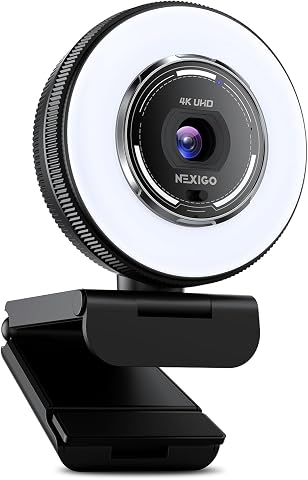 NexiGo N680E Pro 4K Webcam with Ring LightView on Amazon →
- 5
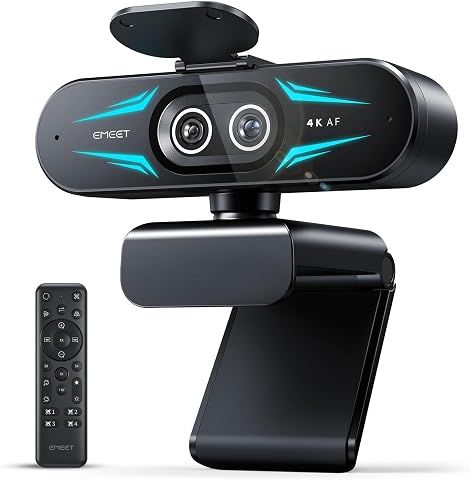 EMEET C60E Dual-Camera 4K Webcam with Wide-Angle and Telephoto LensesView on Amazon →
- 6
 EMEET S600 4K Webcam with Sony Sensor and PDAF AutofocusView on Amazon →
- 7
 EMEET NOVA 4K Webcam with PDAF Autofocus and Dual MicrophonesView on Amazon →
- 8
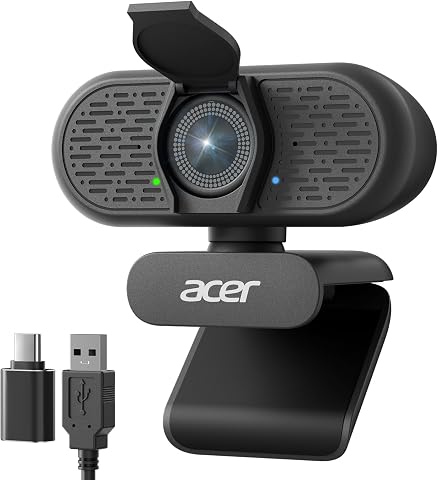 Acer A640 4K Webcam with AI Noise-Canceling MicrophoneView on Amazon →
- 9
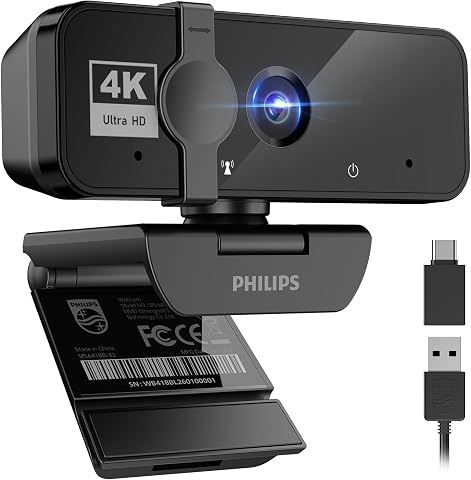 Philips 4K USB Webcam with Microphone and Privacy ShutterView on Amazon →
- 10
 AOC AC310 4K Webcam with Noise-Reducing Microphone and Privacy CoverView on Amazon →
Features That Change the Desk Setup
The comparison matters because many buyers may focus on a 4K label without checking whether the camera suits their room and routine. A stationary worker with good lighting may not benefit from paying extra for tracking or built-in lights, while a presenter who moves around could value faster autofocus or automatic framing.
Privacy is another practical consideration. The source recommends a physical or electronic shutter for people handling confidential material or working in shared spaces. It argues that a physical barrier blocks the lens when the camera is not in use, unlike a software indicator alone. That is guidance from the source, not evidence that any listed model has experienced a security incident.
For readers, the useful takeaway is to compare the whole setup—including room lighting, available USB power, desk space and software controls—rather than treating resolution as a stand-alone measure of quality.
Products Worth Considering

Brother Work Smart 1360 Wireless Color Inkjet All-in-One Printer

HP OfficeJet Pro 8139 Wireless All-in-One Color Inkjet Printer

Dell 27 Plus 4K USB-C Monitor (S2725QC), 27-inch IPS, 120Hz
As an affiliate, we earn on qualifying purchases.
How the Guide Compares Cameras
The source frames its rankings around workplace use rather than resolution alone. It says the assessment considered color accuracy, low-light behavior, autofocus, microphones and privacy, then weighed whether the software makes settings such as zoom, framing and color balance easy to adjust.
Its buying advice distinguishes between users who sit still and those who move or present objects. It says PDAF may help with frequent movement, while a simpler autofocus system may be adequate for a stationary desk setup. It also advises checking for adjustable light color temperature and manufacturer software or firmware support. The supplied text does not provide a full model-by-model specification table for all 10 picks.
“The Logitech MX Brio Ultra HD stands out as the best overall pick for professionals needing reliable color accuracy and robust software support.”
— ThorstenMeyerAI.com guide
Missing Test and Price Details
The supplied guide text does not state when the article was published, what each webcam costs, or how the 10 models scored against one another. It also does not provide detailed test conditions, measured image quality, microphone samples or a complete list of all 10 selections, so readers cannot verify the ranking from this material alone.
Claims about focus behavior, lighting and dual-camera drawbacks are attributed to the guide. The source does not identify independent reviewers or provide data to establish how consistently those results apply across different rooms, computers and conferencing apps. It also does not say which listed models have physical versus electronic shutters.
Check Listings Before Buying
Readers should check the guide’s complete model list and current manufacturer specifications before making a purchase, particularly for privacy shutters, USB power needs and operating-system support. Prices and availability can change, and the source material does not provide them.
Before choosing, compare the camera’s features with the actual workspace: assess room lighting, whether the user moves during calls, and whether extra software controls or a built-in light would be useful. The guide offers no announced follow-up testing or publication schedule; any later ranking changes remain unknown.
Key Questions
Which webcam does the guide rate best overall?
ThorstenMeyerAI.com names the Logitech MX Brio Ultra HD its best overall pick, citing color accuracy and software support. The supplied material does not include scores or test measurements.
Which model is recommended for a dim workspace?
The guide points to the NexiGo N680E Pro, which has a built-in ring light. It also notes that the light adds bulk and may require more USB power.
Do workers need a 4K webcam for video calls?
Not necessarily. The guide’s comparison suggests that lighting, sensor performance, autofocus and software also affect the image. The supplied source does not give a specific bandwidth threshold or establish that every meeting platform will transmit video at 4K.
Why might PDAF matter for work calls?
The guide says Phase Detection Autofocus on the EMEET NOVA and S600 can suit presenters who move or hold objects up to the camera. It says a simpler system may be enough for someone who stays seated, but provides no controlled comparison data.
Does the guide provide prices and a complete ranking?
Not in the supplied material. It refers to 10 models but does not list every pick, provide prices or show a scoring table, so buyers would need to consult the full guide and current product listings.
Source: ThorstenMeyerAI.com