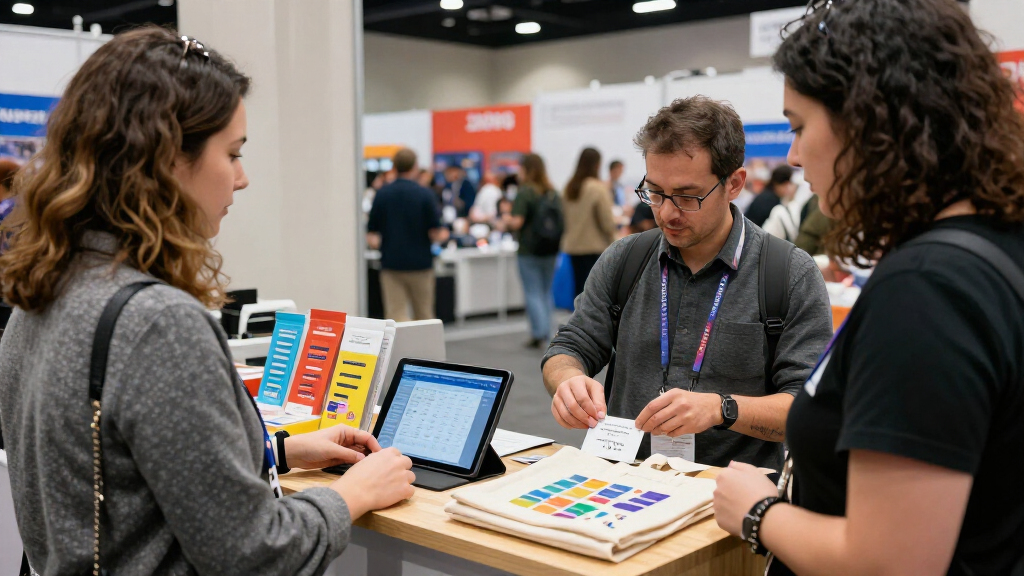

This checklist is for small business teams preparing for a trade show and choosing what to bring to a booth. It covers display pieces, lead capture, and a few useful details that help make the setup feel ready for visitors.

Get business pricing on office and shipping supplies
- Business-only prices and quantity discounts
- Tax-exempt purchasing
- Multiple users, one account, clear invoices
The sections follow the booth from visual display to visitor materials and lead capture. Product picks appear where provided; the branded table cover and brochure rack sections offer selection advice instead.
Use the checklist to match each item to your booth layout, transport needs, and brand style. Before buying, confirm dimensions, setup requirements, and compatibility with the space and materials you plan to use.
Portable Banner Stand
A banner stand can give your booth a clear visual anchor and make your business easier to spot across a busy show floor. The listed pick, Instahibit 10 Pack 33 x 79 Inch Retractable Roll Up Banner Stands, is a multi-unit option to consider when planning more than one display location or keeping matching stands available for several events. Think through where each banner will sit before deciding how many you need: a stand that blocks a walkway or competes with your table can make the booth feel crowded.
Common buying mistakes include choosing artwork before confirming the usable display area, overlooking transport and storage, and assuming every venue allows the same setup. Check the stand dimensions and the printed graphic dimensions separately, and confirm how the banner retracts and is secured for travel. Make sure your artwork has readable text at a distance and leaves enough clear space around logos and key details. If your booth has a low ceiling, wall restrictions, or a narrow footprint, verify that the stand fits those constraints. For a multi-pack, plan a consistent visual system so each banner supports the same message rather than creating competing focal points.
What to look for:
- Confirm the stand and graphic dimensions against your booth footprint.
- Check how the unit retracts, secures, and travels between events.
- Use artwork with readable text and clear branding at a distance.
- Plan banner placement so it does not obstruct visitors or booth access.
- For a multi-pack, keep messaging and visual style consistent.
Instahibit 10 Pack 33 x 79 Inch Retractable Roll Up Banner Stands

This set of 10 retractable banner stands features a quick setup design, sturdy aluminum frames, and protective retractable mechanisms for easy transport and display. Ideal for trade shows, conferences, and promotional events, they offer a versatile and professional advertising solution.
Pros:
- Quick and easy to set up for instant branding
- Sturdy and durable aluminum frame
- Portable with collapsible design and carrying bags
- Supports easy banner replacement
Cons:
- Limited to standard banner size only
- No mention of weather resistance or outdoor suitability
Best for: Teams planning several coordinated banner placements.
Not ideal for: Businesses that need only one compact display piece.
Bottom line: Choose this multi-pack when its quantity and dimensions suit your booth plan.
Tabletop Display
A tabletop display can combine a work surface with a defined presentation area, giving visitors a place to approach while keeping materials organized. The listed pick is the VEVOR Portable Tradeshow Podium Table, 35.43″ x 19.29″ x 37.01″, Displ. Before choosing it, consider how your team will use the surface: product demonstrations, sign-up materials, samples, or conversation all call for different amounts of clear space. The listed dimensions are a useful starting point, but they do not tell you whether the table will fit comfortably alongside chairs, banner stands, or other booth equipment.
A common mistake is judging a display by its footprint alone. Confirm the assembled dimensions, setup steps, and how it packs down for transport; also check the product details for the meaning of the truncated “Displ” description. Measure your vehicle, storage area, and booth space, allowing room for people to move around the table. Think about the height in relation to how staff will present materials and how visitors will interact with them. If the table will hold equipment or samples, verify that the manufacturer’s product information supports that intended use. Plan where cables, handouts, and personal items will go so the main surface stays clear and the setup remains approachable.
What to look for:
- Verify the full product description and exact dimensions before ordering.
- Check assembly, breakdown, and transport requirements.
- Measure the table alongside other booth equipment and visitor space.
- Match the surface layout to demonstrations, samples, or handouts.
- Confirm product details support the items you intend to place on it.
VEVOR Portable Tradeshow Podium Table, 35.43" x 19.29" x 37.01", Display Exhibit
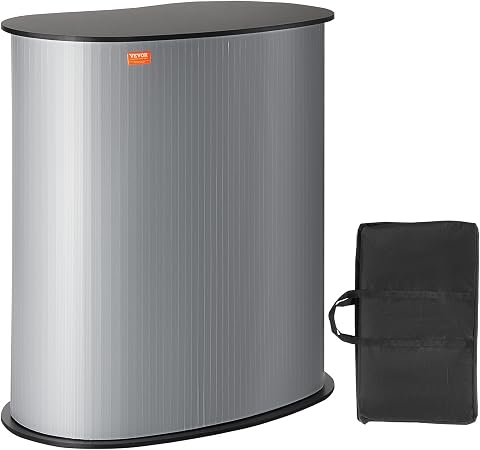
This portable tradeshow podium table features a durable PVC skirt and lacquered wood tabletop, supporting up to 65 pounds. It is foldable for easy storage and quick setup, making it ideal for exhibitions, classrooms, or reception areas.
Pros:
- Sturdy construction with durable PVC and lacquered wood
- Foldable design for easy transport and storage
- Supports up to 65 pounds with spacious internal storage
- Simple Velcro assembly for quick setup
Cons:
- Limited weight capacity for very heavy items
- Basic design may not suit all aesthetic preferences
- Some users may find assembly instructions insufficient
Best for: Booths that need a dedicated presentation table.
Not ideal for: Teams whose layout cannot accommodate the listed footprint.
Bottom line: Confirm the full specifications and booth fit before selecting this podium table.
Branded Table Cover
A branded table cover helps make a standard table feel like part of a cohesive booth. Since no specific product is listed for this slot, begin with the table you expect to use and the way the cover should sit when visitors approach. A loose or undersized cover can look unfinished, while excess fabric may get in the way of storage or movement. Measure the tabletop and the distance from its edge to the floor on each side, then compare those measurements with the cover’s finished dimensions and drop.
One frequent mistake is ordering from the table’s nominal size without checking its actual shape or thickness. Confirm whether the cover is designed for a fitted, stretch, or draped look, and whether its cut accommodates the table you will bring. For the brand artwork, check print placement, color matching, and how the design appears from the visitor side; request a proof if the seller offers one. Also consider laundering or cleaning instructions, fabric feel, and how easily it folds for transport. If the event uses a supplied table, check its dimensions before finalizing the order. Keep key text and logos away from folds and edges, where they may be hidden once the cover is in place.
What to look for:
- Measure the actual tabletop and desired fabric drop on all sides.
- Match the cover style to the table shape and thickness.
- Check artwork placement, colors, and a proof when available.
- Keep important text clear of folds, edges, and hidden areas.
- Review cleaning and packing details for repeated event use.
Business Card Holder
A business card holder gives visitors a simple way to find or take your contact details, and it keeps cards from spreading across the table. The listed pick is the Gothic Skull Business Card Holder for Tattoo Artists – Professional De. Its name signals a distinct aesthetic, so consider whether that style fits your business identity and the tone of the event. A holder should be easy to spot without overpowering other materials; think about where it will sit and whether guests can reach it comfortably from the aisle-facing side.
Do not assume every holder accepts every card format. Check the interior dimensions against the cards you use, especially if they are thicker, square, or otherwise nonstandard. Look for product details about capacity, stability, and whether cards can be removed one at a time without snagging. A common mistake is picking a holder solely for appearance, then finding it takes up too much tabletop space or clashes with the rest of the display. Confirm the full product description, since the supplied name ends with “Professional De,” and review any available materials and care information. Keep a refill supply nearby and place the holder beside related brochures or sign-up information so visitors can connect the card with the right next step.
What to look for:
- Check holder dimensions against your business card format.
- Confirm capacity and whether cards are easy to remove individually.
- Consider how the holder’s style fits your brand and event.
- Review the complete product description and material details.
- Place it where visitors can reach it without crowding the table.
Gothic Skull Business Card Holder for Tattoo Artists – Professional Desk Card Ho

This gothic skull business card holder is designed for tattoo artists and alternative professionals, offering a bold display for standard 3.5" x 2" cards. Made from durable materials with detailed gothic motifs, it adds a distinctive touch to any workspace or reception area.
Pros:
- Unique gothic design enhances workspace aesthetics
- Made with durable, high-quality materials
- Fits standard business cards snugly for a professional look
- Ideal gift for tattoo artists and alternative professionals
Cons:
- Limited to standard card size, not suitable for larger cards
- Design may not appeal to traditional or conservative settings
Best for: Businesses whose visual identity suits the holder’s style.
Not ideal for: Brands seeking a neutral, understated tabletop accessory.
Bottom line: Check the card fit and confirm the holder’s aesthetic suits your booth.
Badge Scanner
A badge or ID scanner can support lead capture when your event workflow depends on collecting visitor information. The listed pick is the Duplex Card & ID Scanner with AmbirScan 3.1 Pro Software. Before buying, confirm that the event provides the type of badges or IDs the scanner is intended to read and that organizers permit this capture method. A device name alone does not establish compatibility with an event’s registration system, so check the software and connection requirements against the tools your team will use.
Common mistakes include assuming the scanner works with every badge format, overlooking computer or operating system requirements, and failing to plan how captured records will be organized afterward. Review the supported formats, software version, connection type, and any required accessories in the full product specifications. Ask event organizers what data is available from badges and whether their platform requires a particular scanner or app. Plan a test workflow before the show: who scans, where records are saved, and how the team will follow up. Consider privacy and consent expectations at the event, and make sure staff can explain the process clearly. If your process depends on the show’s own lead retrieval system, verify the scanner’s compatibility with that system before committing.
What to look for:
- Confirm the event badge or ID formats are supported.
- Check software, computer, operating system, and connection requirements.
- Verify compatibility with the event’s lead retrieval platform.
- Plan where records are saved and how follow-up will be assigned.
- Understand event rules and explain the data capture process to visitors.
Duplex Card & ID Scanner with AmbirScan 3.1 Pro Software

The DS687 duplex scanner handles various card types with features like merging multiple sides into a single image, auto feed, auto print, and kiosk mode. It is suitable for business card scanning and offers high-resolution imaging.
Pros:
- Handles all kinds of cards with duplex scanning
- Includes advanced software features like merging sides and auto feed
- Compact and lightweight design
Cons:
- Limited to Windows 7 and above
- No mention of wireless connectivity
- Requires software installation for full functionality
Best for: Teams that have confirmed scanner and event-system compatibility.
Not ideal for: Exhibitors whose event requires a separate lead retrieval system.
Bottom line: Verify badge formats and software compatibility with the event before choosing this scanner.
Portable Brochure Rack
A portable brochure rack keeps printed information easy to browse and can help separate materials by topic or audience. No specific product is listed for this slot, so choose one around the brochures you actually plan to bring. Start by measuring a sample brochure and noting whether it is a standard size, folded piece, or thicker booklet. Then compare those dimensions with each rack pocket’s usable width and depth; listings may describe overall rack dimensions without making pocket capacity clear.
Buying mistakes often come from choosing a rack that is too small for the handouts, too heavy for transport, or awkward to place within the booth. Check the folded footprint, setup steps, stability, and how it packs away. A rack should be reachable without forcing visitors to cross the booth, and it should not cover signs or narrow the entrance. Consider how many different materials need separate pockets and how quickly staff can restock them. If the rack will sit beside a table, measure the combined footprint and leave space for people to pause and browse. Keep the most relevant brochure in the easiest-to-reach position, and avoid filling every pocket with overlapping or outdated materials.
What to look for:
- Measure brochures and compare them with usable pocket dimensions.
- Check the number of pockets needed for distinct materials.
- Review setup, stability, carrying, and folded storage dimensions.
- Place the rack where visitors can browse without blocking booth access.
- Plan a simple restocking system and remove outdated handouts.
Buy in a practical order: first confirm the booth dimensions and rules, then select the core display pieces, followed by branded table materials and visitor handouts. Add lead-capture equipment after checking the event’s formats and systems. This sequence helps keep each purchase tied to a real setup need.
Keep the checklist close as plans come together, and review measurements, compatibility, and artwork before placing orders. A booth does not need to be complicated to feel prepared and welcoming; thoughtful choices and a clear visitor path go a long way.
Halloween Picks
halloween
As an affiliate, we earn on qualifying purchases.