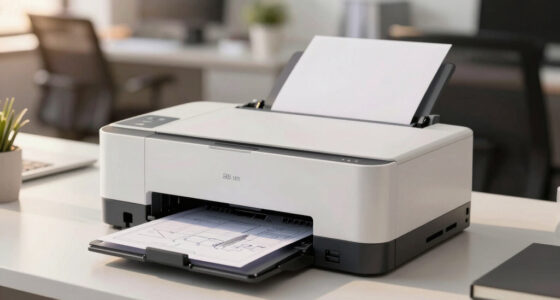

This checklist is for small business owners setting up an office that supports focused work, order handling, and product sales. Use it to think through the essentials before choosing equipment, with everyday tasks and the space you have in mind.

Get business pricing on office and shipping supplies
- Business-only prices and quantity discounts
- Tax-exempt purchasing
- Multiple users, one account, clear invoices
The sections follow the listed picks, then cover a cash drawer with general selection advice. Each entry calls out what the item can help with, what to check before buying, and who may find the pick a suitable match. Fit and compatibility deserve a close look, especially for furniture and connected equipment.
Use the look-for bullets as a quick review list, then compare each product’s current specifications with your setup. Confirm dimensions, supported devices, and included accessories directly with the seller. Start with the items that address your most frequent work needs, and add the rest as your operations grow.
Ergonomic Office Chair
A chair is a daily-use part of a workstation, so it is worth checking how its adjustments and dimensions suit the person who will sit in it. The ELABEST X100 Ergonomic Mesh Office Chair with Footrest is the listed pick for this slot. Before choosing it, review the manufacturer’s description for seat height, overall dimensions, adjustment options, and footrest details. Compare those measurements with the desk and the user’s preferred posture.
A common mistake is treating ergonomic language as proof that a chair will fit every body or workspace. Check the adjustment range against the person’s needs, and make sure the chair can move freely around the desk. Confirm that the floor surface and available clearance work with the chair’s base, and check whether assembly is required. If multiple employees will share the chair, consider whether its adjustment process is practical for frequent changes.
Mesh and a footrest are features named in this pick, but personal comfort is individual. Read the product details carefully and look for a return policy that gives you a reasonable way to assess fit. Measure first, including desk height and the space behind the chair, before committing to a setup.
What to look for:
- Seat-height range that suits the user and desk
- Overall width and depth for the available floor space
- Adjustment details for seat and back support
- Footrest dimensions and stowage needs
- Assembly requirements and return terms
ELABEST X100 Ergonomic Mesh Office Chair with Footrest

The ELABEST X100 is an adjustable mesh office chair with dynamic lumbar support, a reclining backrest, and an extendable footrest. It includes a breathable headrest, flip-up adjustable armrests, and a BIFMA-certified frame rated to support up to 300 lbs.
Pros:
- Adjustable lumbar support and headrest
- Extendable footrest and reclining mechanism
- Breathable mesh construction
- Flip-up armrests help save space
Cons:
- Assembly is required
- The product information does not specify the chair’s overall dimensions
Best for: A workspace where the user wants a mesh chair with a footrest
Not ideal for: A tight office that cannot accommodate the chair’s full footprint
Bottom line: Check the chair’s measurements and adjustment details against the user and workstation before choosing it.
Standing Desk Converter
A desk converter can add a standing-work option without replacing the existing desk, but the surface and monitor arrangement need to work together. The listed pick is the Mount-It! Electric Standing Desk Converter with Dual Monitor Arm, 47.2. Verify the complete product dimensions and what the 47.2-inch measurement refers to, then compare the converter’s footprint with the desk’s usable surface.
One frequent buying mistake is focusing on the lifting feature while overlooking monitor fit and workspace depth. Check the monitor arm’s supported screen sizes and weights, mounting method, and range of movement in the product specifications. Confirm that your monitors have compatible mounting points, and allow room for keyboard, mouse, cables, and any tools you use. The desk itself must also have enough depth and stability for the converter and its load.
Because this model is electric, look for the required power connection and cable routing details. Consider whether the converter’s movement will clear shelves, wall-mounted items, or other equipment above it. If more than one person uses the station, review the controls and adjustment process. Measure the full setup in both its lowest and highest positions before ordering.
What to look for:
- Converter width, depth, and usable work surface
- Monitor arm compatibility, screen limits, and mounting method
- Maximum supported load in the product specifications
- Power and cable-routing requirements
- Clearance above the desk through the full height range
Mount-It! Electric Standing Desk Converter with Dual Monitor Arm, 47.2" Wide, Bl
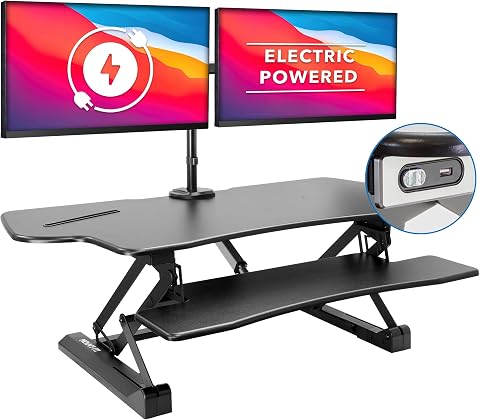
This electric standing desk converter features easy one-touch height adjustments from 6.3" to 19.3", allowing seamless switching between sitting and standing. It supports two monitors up to 32" each with adjustable arms, and includes a spacious desktop, keyboard tray, and USB charging port for a complete ergonomic workspace.
Pros:
- Easy one-touch height adjustment for ergonomic comfort
- Supports dual monitors with full adjustability
- Spacious desktop with built-in device channel and USB charger
- Sturdy steel construction with sleek design
Cons:
- Maximum monitor weight support per arm is 22 lbs, may be limiting for heavier screens
- Assembly required, which may take some time
Best for: A desk setup that needs an electric standing option and monitor arms
Not ideal for: A shallow or unstable desk with limited overhead clearance
Bottom line: Confirm desk fit, monitor compatibility, and clearance across the converter’s full movement range.
Label Printer
Shipping labels are part of order fulfillment, so a dedicated printer can help organize that task. The listed option is the Phomemo D422S Bluetooth Shipping Label Printer 4×6 with Built-in Scale. Before buying, confirm that the printer supports the label format and shipping workflow you use, and check which devices and operating systems it works with.
A common mistake is assuming Bluetooth means effortless connection to every computer, phone, or shipping platform. Review the compatibility list and setup instructions for your exact device, app, and carrier workflow. Check whether the scale’s readings can be used in the process you follow, and whether the product details explain how it connects or transfers weight information. The built-in scale does not by itself confirm integration with a particular service.
Also check the supported label width, roll or fanfold media requirements, and whether labels are included. Think about where the printer will sit and how you will feed labels without tangling cables or obstructing other packing tools. If several staff members print, confirm how many devices can pair and what reconnecting involves. Validate your workflow against the product documentation before making it part of daily shipping.
What to look for:
- Supported label size and media type
- Compatibility with your operating system and devices
- Setup steps for Bluetooth and the apps you use
- Scale specifications and how readings are used
- Included labels, power supply, and connection accessories
Phomemo D422S Bluetooth Shipping Label Printer 4×6 with Built-in Scale
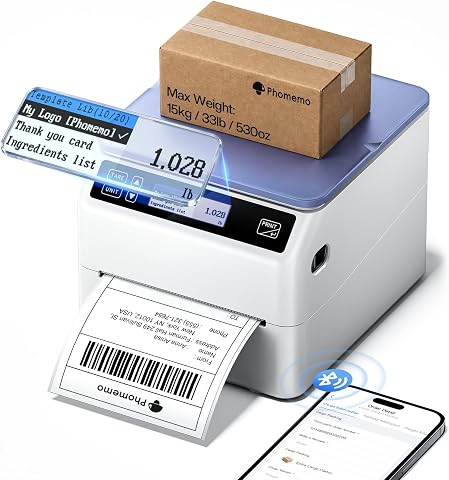
The Phomemo D422S is an all-in-one thermal shipping label printer with an integrated high-precision postal scale accurate to ±0.1oz (up to 33lb/15kg), with weights syncing automatically to your devices. It supports offline printing with 20+ logo templates, Bluetooth 5.0 and USB connectivity, and a built-in telescopic label bin holding up to 250 4×6 labels.
Pros:
- Built-in scale eliminates need for a separate postal scale, with automatic weight syncing to prevent manual entry errors
- True offline printing with 20+ pre-set logo templates requires no phone, PC, or app
- Compact design with integrated label bin saves about 50% desk space
- Broad compatibility with major carriers, marketplaces, and operating systems
Cons:
- Rate comparison feature (ShipCheer) requires the Labelife app rather than being standalone
- Scale capacity limited to 33lb, insufficient for heavier packages
Best for: A small fulfillment station that uses 4×6 shipping labels
Not ideal for: A workflow that requires unconfirmed app or carrier integration
Bottom line: Check device and workflow compatibility before relying on the printer for daily fulfillment.
Barcode Scanner
A scanner can speed up product identification at checkout or during inventory work, provided it matches the codes and devices in use. This checklist’s pick is the Honeywell Voyager XP 1472g Wireless 1D/2D Barcode Scanner Kit. Review the product specifications for supported barcode types and included kit components, then compare them with the labels or codes your business actually encounters.
Do not assume that wireless operation guarantees compatibility with every register, tablet, or inventory app. Check the connection options, supported operating systems, and setup requirements for the specific host device. Confirm how the scanner is charged or powered, what the kit includes, and whether its charging or presentation base is part of the package. If staff move between stations, consider range and pairing details in the manufacturer’s documentation.
Another common mistake is choosing a scanner based only on code format while overlooking the software workflow. Verify that the scanner can pass scanned data into your point-of-sale or inventory system as expected, and determine whether setup changes are needed for your preferred format. Test with the actual code labels and devices before a busy operating period. Match scanner and software requirements to avoid interruptions at checkout.
What to look for:
- Supported 1D and 2D barcode formats
- Compatibility with register, tablet, and inventory software
- Wireless connection and pairing requirements
- Power, charging, and included kit components
- Range and base details for your work area
Honeywell Voyager XP 1472g Wireless 1D/2D Barcode Scanner Kit

This wireless scanner reads 1D and 2D barcodes, PDF formats, postal codes, and DotCode, including damaged labels and codes displayed on mobile screens. The kit includes a charging cradle, power adapter, USB and RS232 cables, and is designed to withstand frequent drops and tumbles in busy retail environments.
Pros:
- Reads a wide range of barcode types, including mobile screen codes
- Can scan poorly printed, worn, or damaged barcodes
- Designed to withstand frequent drops and tumbles
- Includes cables and a charging cradle for setup
Cons:
- Requires three AAA batteries
Best for: Businesses that scan both 1D and 2D codes in a compatible workflow
Not ideal for: A setup whose software or host-device compatibility is unverified
Bottom line: Confirm code support, software compatibility, and kit contents before integrating the scanner.
Cash Drawer
A cash drawer helps give cash handling a defined place at a counter or checkout station. Since no specific product is listed for this slot, choose one by starting with the register or point-of-sale system it must work with. Check the system’s supported drawer connection and opening method in its documentation, then match the drawer accordingly.
A common mistake is buying by exterior size alone. Measure the counter space and the clearance needed to open the drawer fully, and check how cash compartments are arranged. Consider the mix of bills and coins your team handles, whether a removable till is useful, and whether the drawer can be secured as required for your location. Confirm included keys and any cables or adapters before purchasing.
Compatibility can depend on the receipt printer or point-of-sale hardware, so verify the complete connection path rather than relying on a connector photo. Think through who needs access and how the drawer will be managed during a shift. Confirm the opening trigger and test it with the intended register setup before using the drawer for live transactions.
What to look for:
- Documented compatibility with your POS or register
- Opening trigger and required connection path
- Drawer dimensions and full extension clearance
- Till layout for the bills and coins you handle
- Security features, keys, and included cables
Product Photography Light Box
Consistent product images can make a catalog easier to maintain, and a light box can provide a defined space for photographing smaller items. The listed pick is the Product Photography Backdrops Kit, 16.5 x 11.7 inches, 22 Designs. Confirm the kit’s full contents and whether it includes a light box, backdrops, or both; the product name alone does not settle that detail.
A common mistake is assuming the listed size will fit every product. Compare the interior dimensions with the largest items you plan to photograph, allowing room for the camera angle and background. Check whether the listed dimensions describe the usable shooting area or the kit’s exterior. Review the backdrop designs and surfaces to see whether they suit your product colors and the visual style of your store.
Also verify what lighting, supports, and power accessories are included, and whether you need to provide your own camera or phone stand. Consider how easily the setup can be stored between shoots and whether the background can be changed without disrupting the product. If you photograph varied product sizes, plan a separate approach for items that exceed the kit’s usable space. Check contents and scale before expecting the kit to cover your full catalog.
What to look for:
- Usable shooting dimensions for your largest products
- Whether the kit includes a light box and lighting
- Backdrop designs, material, and changeover method
- Included supports, power items, and accessories
- Storage needs and camera or phone positioning
Product Photography Backdrops Kit, 16.5 x 11.7 inches, 22 Designs
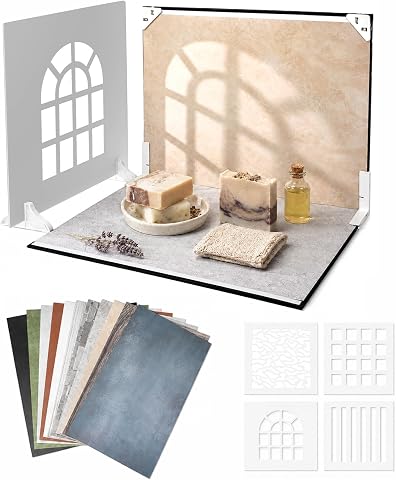
This photography backdrop kit includes 11 double-sided laminated sheets with 22 designs, a foldable backdrop board, props, and a carry bag, ideal for creating professional product photos and content. Suitable for small businesses, content creators, and social media influencers, it offers versatile backgrounds and shadow effects for various products.
Pros:
- Versatile backgrounds with 22 designs for different products and styles
- Durable, easy to wipe clean laminated sheets
- Quick setup with foldable backdrop and stable L-brackets
- Includes shadow props for added visual effects
Cons:
- Limited size may not suit larger products
- Some users may find the backdrop sheets too thin for certain uses
- Only suitable for tabletop photography
Best for: Small products that fit within the verified shooting area
Not ideal for: Large items or workflows needing unconfirmed lighting equipment
Bottom line: Confirm the kit contents and usable dimensions against the products you photograph.
Build in a budget-first order by starting with the item that removes the most friction from current work: seating for a daily workstation, a label printer or scanner for fulfillment, or a compatible cash drawer for checkout. Add a desk converter or photography setup when your space and product workflow can support it. For each purchase, compare required specifications and included components with your actual devices and measurements.
You do not need to outfit every function at once. Choose one priority, verify fit and compatibility, and add the next item when your business is ready. A thoughtful setup can grow alongside your operation, with practical checks helping each purchase serve the work you do.
Halloween Picks
halloween
As an affiliate, we earn on qualifying purchases.