
🔍 Read the full analysis: 6 Thunderbolt Docks To Help Streamline Your Desk In 2027 on ThorstenMeyerAI.com

Get business pricing on office and shipping supplies
- Business-only prices and quantity discounts
- Tax-exempt purchasing
- Multiple users, one account, clear invoices
TL;DR
A buying guide ranks six Thunderbolt docks for different desk setups, with the Anker Prime 14-in-1 Thunderbolt 5 Dock as its top overall pick. The guide also compares five Thunderbolt 4 models and stresses that a dock’s ports do not guarantee a particular charging or display result on every computer.
ThorstenMeyerAI.com has compared six Thunderbolt docks for buyers planning a streamlined desk setup, ranking the Anker Prime 14-in-1 Thunderbolt 5 Dock first overall and outlining five Thunderbolt 4 alternatives, as detailed in the original analysis. The guide’s central caution is that computer, operating-system and monitor compatibility can matter more than a dock’s advertised number of ports.
The guide recommends Anker’s Prime dock for buyers seeking Thunderbolt 5 bandwidth and a broad range of connections. It names the Plugable TBT-UDM as a strong fit for a Thunderbolt 4 setup and the Dell Pro SD25TB4 as a current Dell-oriented option. Buyers considering docks for specialized workflows can also consult Thunderbolt docks for machine learning workflows. These are the source’s rankings and recommendations, not independent performance test results included in the supplied material.
The other three models are the Plugable 100W Thunderbolt 4 dock, the Dell WD19TB and the Dell WD19TBS. The guide describes the Plugable model as suited to buyers prioritizing 100W charging and dual-monitor use. It distinguishes the Dell WD19TB configuration by its listed 180W adapter and says the related WD19TBS has 130W Power Delivery; buyers should check their laptop’s requirements rather than treat the model names or figures as interchangeable.
The source does not provide a full specification table in the supplied material, nor does it give prices, test methods or measured performance results. It frames the comparison around dock generation, host compatibility, charging, display support and port variety. Its rankings should be read as buying guidance based on those criteria, not as proof that each model will deliver the same results across computers.
The 6 picks
- 1
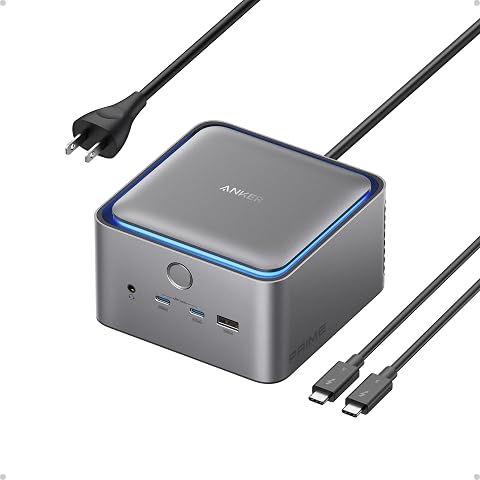 Anker Prime 14-in-1 Thunderbolt 5 Docking StationView on Amazon →
- 2
 Dell Pro Thunderbolt 4 Smart Dock SD25TB4 – USB-C Station 130W, 4 Displays 4K…View on Amazon →
- 3
 Plugable Thunderbolt 4 Dock with 100W Charging, Dual MonitorView on Amazon →
- 4
 Plugable Thunderbolt 4 Dock (TBT-UDM) for Mac and WindowsView on Amazon →
- 5
 Dell WD19TB Thunderbolt Docking Station with 180W AC AdapterView on Amazon →
- 6
 Dell Thunderbolt Dock WD19TBS with 130W Power DeliveryView on Amazon →
Compatibility Shapes the Dock Choice
A dock can consolidate cables and connect displays, storage, networking and other desk equipment through a laptop connection. But buying one based only on its advertised port count risks missing the limits imposed by the host computer, operating system and monitor configuration. That can affect how many screens work, which resolutions and refresh rates are available, and whether a particular connection needs an adapter.
Power figures also need careful reading. The guide separates the WD19TB’s 180W adapter from the WD19TBS’s stated 130W Power Delivery, while describing a Plugable option around 100W charging. Those figures do not, by themselves, establish that a dock can replace every laptop’s power supply. Checking the computer maker’s requirements is particularly relevant for buyers who use demanding laptops or run intensive tasks while connected.
The comparison also presents a practical tradeoff: Thunderbolt 5 headroom versus established Thunderbolt 4 options. Buyers whose computers cannot use the newer connection’s capabilities may not gain from paying for it. Matching the dock to the equipment already in use can be more useful than choosing the newest generation by default.
Products Worth Considering

Canon Color imageCLASS MF753Cdw II Wireless All-in-One Color Laser Printer

FLEXISPOT WoodiX 55 x 28-Inch Solid Wood Executive Standing Desk, Walnut

FLEXISPOT E6 MAX Dual-Motor Electric Standing Desk, 55 x 28 in, Walnut Top, Black Frame
As an affiliate, we earn on qualifying purchases.
How the Six Models Differ
The source organizes its six picks around distinct buyer priorities rather than treating the docks as interchangeable. Anker’s model leads the ranking for its Thunderbolt 5 positioning and connection range. Among the Thunderbolt 4 choices, the TBT-UDM is presented as the cross-platform option, while the other Plugable dock emphasizes 100W charging and dual displays. The Dell Pro SD25TB4 is described as a newer Dell-oriented choice, while the WD19 variants may appeal to people matching an existing Dell setup.
The supplied guide does not state exact prices, availability or a date for each product’s release. It also does not include a complete port-by-port specification for every dock. Its advice is to start with the laptop’s exact connection specification, the monitors’ resolution, refresh rate and inputs, and the devices that will remain connected. USB-C connector shape alone does not confirm Thunderbolt support, so buyers are advised to check the computer’s specifications and operating-system compatibility.
““A dock’s port count alone does not guarantee that every screen or peripheral will work as expected.””
— ThorstenMeyerAI.com’s buying guide
Specs and Compatibility Still Need Checking
The supplied source does not establish current prices, stock, warranty terms or independently measured performance for the six models. It also does not provide every model’s full port list or a complete set of supported display configurations. The recommendations therefore do not resolve which dock offers the best value at a particular price or how each will perform with an individual laptop.
Actual display output and charging behavior remain dependent on the computer model, operating system, monitor connections and workload. The source warns that advertised display connections do not guarantee that every host can drive every screen at its maximum settings. Buyers should verify the exact supported monitor arrangement and laptop power needs before purchase; the supplied information does not establish universal compatibility for any of the docks.
Check Your Setup Before Buying
The next step for buyers is to compare their laptop’s specifications with the dock’s detailed compatibility information. Confirm whether the computer supports Thunderbolt 4 or Thunderbolt 5, how much power it needs, and which display combinations its operating system supports. Then check each monitor’s resolution, refresh rate and inputs alongside the dock’s available connections.
Because the source gives no price or availability snapshot, readers should also check current retailer and manufacturer listings before making a decision. The guide’s rankings can help narrow the options, but the right choice depends on the specific laptop and desk equipment, not the ranking alone.
Key Questions
Which dock does the guide rank first?
ThorstenMeyerAI.com ranks the Anker Prime 14-in-1 Thunderbolt 5 Dock as its best overall pick, citing its newer-generation bandwidth positioning and broad connection focus.
Which options are Thunderbolt 4 docks?
The five Thunderbolt 4 options named are the Plugable TBT-UDM, Plugable 100W model, Dell Pro SD25TB4, Dell WD19TB and Dell WD19TBS.
Can any of these docks guarantee two monitors will work?
No universal result is established in the supplied guide. Monitor support depends on the laptop, operating system, display configuration and connections, so check the exact setup before buying.
Does the WD19TB’s 180W figure mean it delivers 180W to a laptop?
Not necessarily. The guide identifies a listed 180W adapter for the WD19TB and separately cites 130W Power Delivery for the WD19TBS. Buyers should confirm the dock’s delivered charging power and their laptop’s requirements in the product specifications.
Source: ThorstenMeyerAI.com